
Mise en place du cluster Centreon
Préparation de la plateforme
Double flux RRD
Afin de permettre de voir les graphs sur les 2 plateformes il faut mettre en place la génération des graphs sur les 2 serveurs centraux.
Modification des outputs RRD
Aller dans le menu Configuration > Pollers > Broker configuration
Sélectionner central-broker-master et aller sur l’onglet Output.
Par défaut « Host to connect to » pointe sur localhost
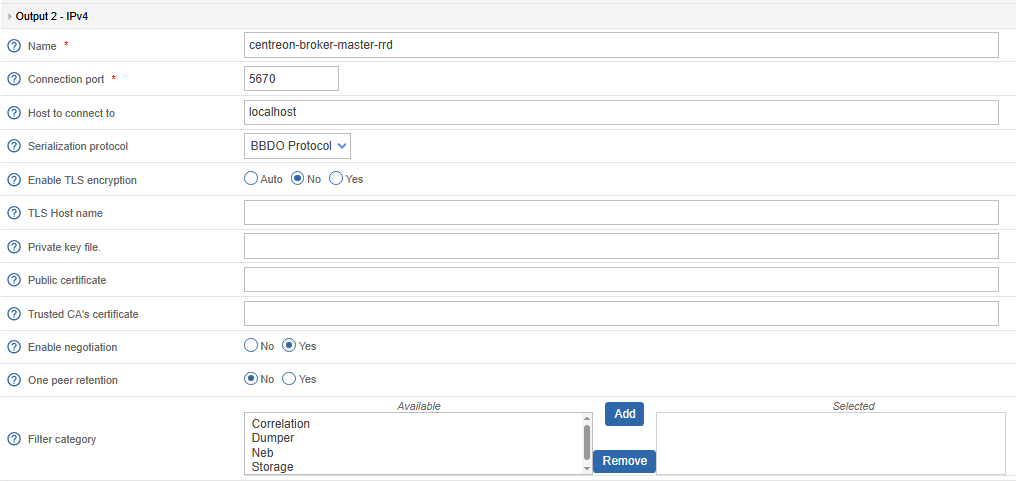
Nous allons faire en sorte de créer 2 sorties vers chaque serveurs centraux
- Vers le master (Celui ou tous les services sont démarrés)

- Vers le slave
- On ajoute une nouvelle sortie

- On configure le 2ème serveur central

Double flux Mysql
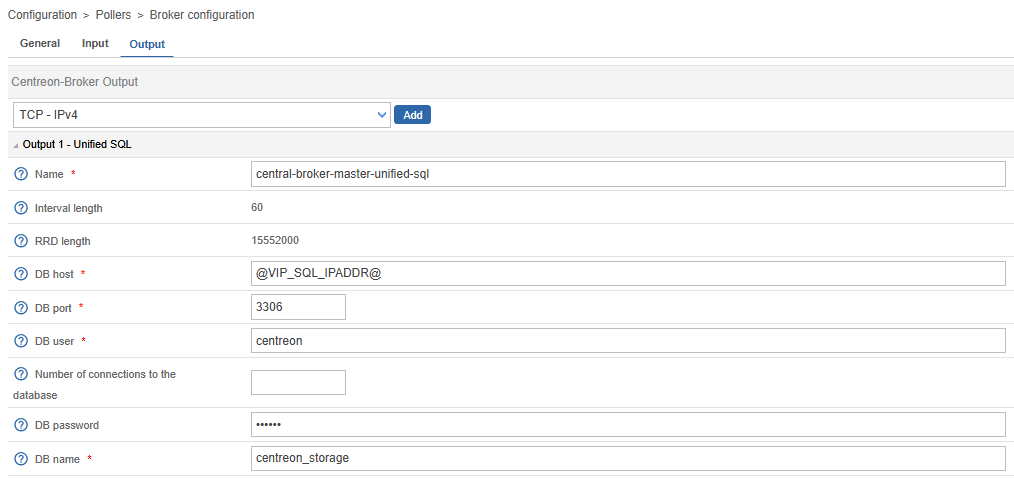
Le double flux Mysql est pour sa part assuré par la réplication des bases.
Il est donc nécessaire de demander d’écrire sur la VIP pour assurer la consistance des données en écrivant sur le master actif
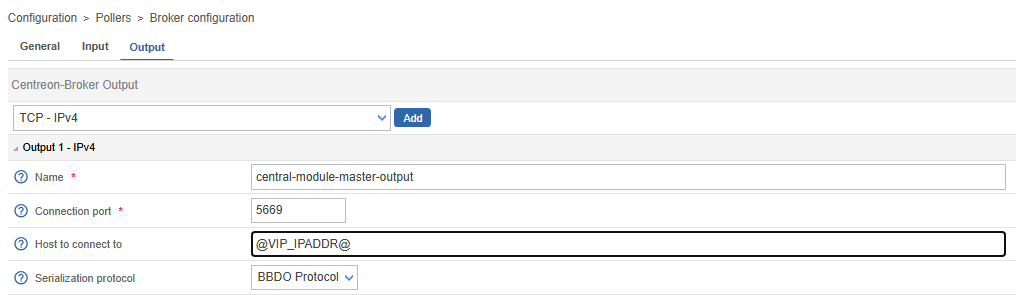
Configuration des pollers
Il est important de demander aux pollers d’écrire sur la VIP et non pas sur une IP directement
Finalisation
Export de la configuration
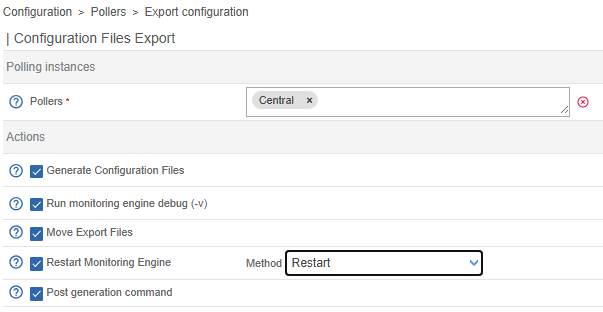
Rajouter les pollers aux besoins
Préparation des serveurs centraux
Synchronisation des fichiers de configuration
Depuis le serveur central qui sera le master :
rsync -a /etc/centreon-broker/*json CENTRAL_SLAVE_IPADDR:/etc/centreon-broker/Installation des briques du cluster
dnf config-manager --enable highavailability
dnf install centreon-ha-web pcs pacemaker corosync corosync-qdeviceEchange des clés ssh
- Compte centreon
su – centreon- Génération des clé ssh
ssh-keygen -t ed25519 -a 100Laisser tous les champs à vide
- • Echange des clés ssh
- Sur le serveur Web1 et Web2
cat ~/.ssh/id_ed25519.pub- Copier le contenu de la clé Web1 sur le serveur Web2 et inversement
vi ~/.ssh/authorized_keysInsérer le contenu de la clé publique de l’autre membre du cluster dans le fichier
- Modifier les droits du fichier
chmod 600 ~/.ssh/authorized_keys- Validation de la connexion SSH sans Mot de passe
ssh <nom de l'autre nœud>Configuration du service de synchronisation
Le service de synchronisation centreon-central-sync nécessite que l’on définisse pour chaque nœud dans /etc/centreon-ha/centreon_central_sync.pm l’adresse IP de son correspondant :
Ainsi pour le serveur CENTREON-WEB1 on doit avoir :
our %centreon_central_sync_config = (
peer_addr => "CENTRAL_SLAVE_IPADDR"
);
1;Et pour le serveur CENTREON-WEB2 on doit avoir :
our %centreon_central_sync_config = (
peer_addr => "CENTRAL_MASTER_IPADDR"
);
1;Suppression des crons
Les cron vont être supportés par gorgone il faut donc supprimer les crontab linux sur les 2 serveurs Web
rm -f /etc/cron.d/centreon
rm -f /etc/cron.d/centstorage
rm -f /etc/cron.d/centreon-auto-disco
rm -f /etc/cron.d/centreon-ha-mysqlGestion des droits
- Réplication des fichiers
- Découverte des services
Arrêt des services
L’arrêt relance des services vont être géré directement par le cluster. Il faut donc désactiver le démarrage automatique des services
- Sur les serveurs Web
- Sur les Bases de données
Préparation du quorum
Services du cluster
- Installation des services
- Démarrage des services
- Configuration du quorum
- Il faut forcer l’utilisation d’IP V4 dans le fichier /etc/sysconfig/corosync-qnetd
Utilisateur hacluster
Pour simplifier l’installation il est important de mettre le même mot de passe pour le compte hacluster de tous les membres du cluster : Centraux, DB et quorum inclus.
passwd haclusterDémarrage des services
Sur l’ensemble des membres du cluster
- Démarrer le service
- Activer le démarrage automatique
Echange des clés ssh pour le cluster
pcs host auth \
"Centreon-Web1" \
"Centreon-Web2" \
"Centreon-db1" \
"Centreon-DB2" \
"Centreon-Quorum" \
-u "hacluster" \
-p 'CENTREON_CLUSTER_PASSWD'
Retour
Centreon-DB2: Authorized
Centreon-Web2: Authorized
Centreon-DB1: Authorized
Centreon-Quorum: Authorized
Centreon-Web1: AuthorizedCréation du cluster
pcs cluster setup centreon_cluster \
    "Centreon-Web1" \
    "Centreon-Web2" \
    "Centreon_DB1" \
    "Centreon-DB2" \
--forceSur les serveurs Centraux et Databases
Démarrage des services
Activation des services
systemctl enable pacemaker pcsd corosync
Created symlink /etc/systemd/system/multi-user.target.wants/pacemaker.service → /usr/lib/systemd/system/pacemaker.service.
Created symlink /etc/systemd/system/multi-user.target.wants/pcsd.service → /usr/lib/systemd/system/pcsd.service.
Created symlink /etc/systemd/system/multi-user.target.wants/corosync.service → /usr/lib/systemd/system/corosync.service.
Démarage des services
systemctl restart pacemaker pcsd corosyncContrôle des services
systemctl status pacemaker pcsd corosync
● pacemaker.service - Pacemaker High Availability Cluster Manager
     Loaded: loaded (/usr/lib/systemd/system/pacemaker.service; enabled; preset: disabled)
     Active: active (running) since Thu 2026-07-09 11:45:53 CEST; 51s ago

● pcsd.service - PCS GUI and remote configuration interface
     Loaded: loaded (/usr/lib/systemd/system/pcsd.service; enabled; preset: disabled)
     Active: active (running) since Thu 2026-07-09 11:45:44 CEST; 1min 1s ago

● corosync.service - Corosync Cluster Engine
     Loaded: loaded (/usr/lib/systemd/system/corosync.service; enabled; preset: disabled)
     Active: active (running) since Thu 2026-07-09 11:45:53 CEST; 51s ago
Sur le serveur central Web 1 ou autre Nœud du cluster
Contrôle du cluster
pcs status
Cluster name: centreon_cluster
Cluster Summary:
* Stack: corosync (Pacemaker is running)
* Current DC: Centreon-DB1 (version 2.1.10-2.el9-5693eaeee) - partition with quorum
* Last updated: Thu Jul  9 11:56:04 2026 on Centreon-Web1
* Last change:  Thu Jul  9 11:55:08 2026 by root via root on Centreon-Web1
* 4 nodes configured
* 0 resource instances configured
Node List:
* Online: [ Centreon-DB1 Centreon-DB2 Centreon-Web1 Centreon-Web2 ]
Full List of Resources:
* No resources
Daemon Status:
corosync: active/enabled
pacemaker: active/enabled
pcsd: active/enabledDéfinition des propriétés par défaut
pcs property set symmetric-cluster="true"
pcs property set stonith-enabled="false"
pcs resource defaults update resource-stickiness="100"Réplication de la configuration sur les autres membres
pcs quorum device add model net \
host="Centreon-Quorum" \
algorithm="ffsplit"Retour de la commande
Setting up qdevice certificates on nodes...
Centreon-DB2: Succeeded
Centreon-Web2: Succeeded
Centreon-Web1: Succeeded
Centreon-DB1: Succeeded
Enabling corosync-qdevice...
Centreon-DB1: corosync-qdevice enabled
Centreon-Web1: corosync-qdevice enabled
Centreon-DB2: corosync-qdevice enabled
Centreon-Web2: corosync-qdevice enabled
Sending updated corosync.conf to nodes...
Centreon-DB1: Succeeded
Centreon-Web1: Succeeded
Centreon-Web2: Succeeded
Centreon-DB2: Succeeded
Centreon-Web1: Corosync configuration reloaded
Starting corosync-qdevice...
Centreon-DB1: corosync-qdevice started
Centreon-Web1: corosync-qdevice started
Centreon-Web2: corosync-qdevice started
Centreon-DB2: corosync-qdevice started
Configuration du cluster Mysql
Nous allons travailler sur les 2 serveurs base de données Centreon
Création des comptes Centreon pour le cluster
Se connecter à mariadb sur les 2 serveurs Centreon-DB
Pour les Databases sur le serveur Slave
CREATE USER 'Centreon'@'DATABASE_SLAVE_IPADDR' IDENTIFIED BY 'MARIADB_CENTREON_PASSWD';
GRANT ALL PRIVILEGES ON centreon.* TO 'Centreon@'@'@DATABASE_SLAVE_IPADDR@';
GRANT ALL PRIVILEGES ON centreon_storage.* TO 'Centreon'@'DATABASE_SLAVE_IPADDR';Si vous utilisez centreon-KB :
GRANT ALL PRIVILEGES ON centreon_KB.* TO 'Centreon'@'DATABASE_SLAVE_IPADDR';Pour les Databases sur le serveur Master
CREATE USER 'Centreon'@'DATABASE_MASTER_IPADDR' IDENTIFIED BY 'MARIADB_CENTREON_PASSWD';
GRANT ALL PRIVILEGES ON centreon.* TO ' Centreon'@'DATABASE_MASTER_IPADDR';GRANT ALL PRIVILEGES ON centreon_storage.* TO 'Centreon'@'DATABASE_MASTER_IPADDR';Si vous utilisez centreon-KB
GRANT ALL PRIVILEGES ON centreon_KB.* TO 'Centreon'@'DATABASE_SLAVE_IPADDR';Pour l’administration depuis le central WEB1
CREATE USER 'Centreon'@'CENTRAL_WEB1_IPADDR' IDENTIFIED BY 'MARIADB_CENTREON_PASSWD';
GRANT ALL PRIVILEGES ON centreon.* TO ' Centreon'@'CENTRAL_WEB1_IPADDR';GRANT ALL PRIVILEGES ON centreon_storage.* TO 'Centreon'@'CENTRAL_WEB1_IPADDR';Si vous utilisez centreon-KB
GRANT ALL PRIVILEGES ON centreon_KB.* TO 'Centreon'@'DATABASE_SLAVE_IPADDR';Pour l’administration depuis le central WEB2
CREATE USER 'Centreon'@'CENTRAL_WEB2_IPADDR' IDENTIFIED BY 'MARIADB_CENTREON_PASSWD';
GRANT ALL PRIVILEGES ON centreon.* TO ' Centreon'@'CENTRAL_WEB2_IPADDR';GRANT ALL PRIVILEGES ON centreon_storage.* TO 'Centreon'@'CENTRAL_WEB2_IPADDR';Si vous utilisez centreon-KB
GRANT ALL PRIVILEGES ON centreon_KB.* TO 'Centreon'@'CENTRAL_WEB2_IPADDR';Création des comptes de répilication pour le cluster
Sur le serveur database Master
GRANT SHUTDOWN, PROCESS, RELOAD, SUPER, SELECT, REPLICATION CLIENT, REPLICATION SLAVE ON *.*
TO 'replication'@'localhost' IDENTIFIED BY 'MARIADB_REPL_PASSWD';
GRANT SHUTDOWN, PROCESS, RELOAD, SUPER, SELECT, REPLICATION CLIENT, REPLICATION SLAVE ON *.*
TO 'replication'@'DATABASE_SLAVE_IPADDR' IDENTIFIED BY 'MARIADB_REPL_PASSWD';
GRANT SHUTDOWN, PROCESS, RELOAD, SUPER, SELECT, REPLICATION CLIENT, REPLICATION SLAVE ON *.*
TO 'replication'@'DATABASE_MASTER_IPADD' IDENTIFIED BY 'MARIADB_REPL_PASSWD';
GRANT SHUTDOWN, PROCESS, RELOAD, SUPER, SELECT, REPLICATION CLIENT, REPLICATION SLAVE ON *.*
TO 'replication'@'CENTRAL_SLAVE_IPADDR' IDENTIFIED BY 'MARIADB_REPL_PASSWD';
GRANT SHUTDOWN, PROCESS, RELOAD, SUPER, SELECT, REPLICATION CLIENT, REPLICATION SLAVE ON *.*
TO 'replication'@'CENTRAL_MASTER_IPADDR' IDENTIFIED BY 'MARIADB_REPL_PASSWD';Sur le serveur database Slave
GRANT SHUTDOWN, PROCESS, RELOAD, SUPER, SELECT, REPLICATION CLIENT, REPLICATION SLAVE ON *.*
TO 'replication'@'localhost' IDENTIFIED BY 'MARIADB_REPL_PASSWD';
GRANT SHUTDOWN, PROCESS, RELOAD, SUPER, SELECT, REPLICATION CLIENT, REPLICATION SLAVE ON *.*
TO 'replication'@'DATABASE_SLAVE_IPADDR' IDENTIFIED BY 'MARIADB_REPL_PASSWD';
GRANT SHUTDOWN, PROCESS, RELOAD, SUPER, SELECT, REPLICATION CLIENT, REPLICATION SLAVE ON *.*
TO 'replication'@'DATABASE_MASTER_IPADD' IDENTIFIED BY 'MARIADB_REPL_PASSWD';
GRANT SHUTDOWN, PROCESS, RELOAD, SUPER, SELECT, REPLICATION CLIENT, REPLICATION SLAVE ON *.*
TO 'replication'@'CENTRAL_SLAVE_IPADDR' IDENTIFIED BY 'MARIADB_REPL_PASSWD';
GRANT SHUTDOWN, PROCESS, RELOAD, SUPER, SELECT, REPLICATION CLIENT, REPLICATION SLAVE ON *.*
TO 'replication'@'CENTRAL_MASTER_IPADDR' IDENTIFIED BY 'MARIADB_REPL_PASSWD';Configuration des bases de données
Lancer les commandes suivantes
Sur le master
Création du fichier de configuration pour le cluster
cat > /etc/my.cnf.d/server.cnf <<EOF
[server]
server-id=1 # SET TO 1 FOR MASTER AND 2 FOR SLAVE
#read_only
log-bin=mysql-bin
binlog-do-db=centreon
binlog-do-db=centreon_storage
innodb_flush_log_at_trx_commit=1
sync_binlog=1
binlog_format=MIXED
slave_compressed_protocol=1
slave_parallel_mode=conservative
datadir=/var/lib/mysql
pid-file=/var/lib/mysql/mysql.pid
skip-slave-start
log-slave-updates
gtid_strict_mode=ON
expire_logs_days=7
ignore-db-dir=lost+found
# Tuning standard Centreon
innodb_file_per_table=1
open_files_limit=32000
key_buffer_size=256M
sort_buffer_size=32M
join_buffer_size=4M
thread_cache_size=64
read_buffer_size=512K
read_rnd_buffer_size=256K
max_allowed_packet=64M
# Uncomment for 4 Go Ram
#innodb_buffer_pool_size=512M
# Uncomment for 8 Go Ram
#innodb_buffer_pool_size=1G
EOFAjouter après la ligne 6 si vous avez installé centreon-kb Au fichier ci-dessous
binlog-do-db=centreon_storageSur le slave
Création du fichier de configuration pour le cluster
cat > /etc/my.cnf.d/server.cnf <<EOF
[server]
server-id=2 # SET TO 1 FOR MASTER AND 2 FOR SLAVE
#read_only
log-bin=mysql-bin
binlog-do-db=centreon
binlog-do-db=centreon_storage
innodb_flush_log_at_trx_commit=1
sync_binlog=1
binlog_format=MIXED
slave_compressed_protocol=1
slave_parallel_mode=conservative
datadir=/var/lib/mysql
pid-file=/var/lib/mysql/mysql.pid
skip-slave-start
log-slave-updates
gtid_strict_mode=ON
expire_logs_days=7
ignore-db-dir=lost+found
# Tuning standard Centreon
innodb_file_per_table=1
open_files_limit=32000
key_buffer_size=256M
sort_buffer_size=32M
join_buffer_size=4M
thread_cache_size=64
read_buffer_size=512K
read_rnd_buffer_size=256K
max_allowed_packet=64M
# Uncomment for 4 Go Ram
#innodb_buffer_pool_size=512M
# Uncomment for 8 Go Ram
#innodb_buffer_pool_size=1G
EOFAjouter après la ligne 6 si vous avez installé centreon-kb Au fichier ci-dessous
binlog-do-db=centreon_storageRedémarrage du service sur les 2 serveurs mariadb
Systemctl restart mariadbContrôler la ligne :
Systemctl status mariadbRetour attendu :
Active: active (running)Mise en place de la réplication
Mise à jour des fichiers de variables Centreon
cat > /etc/centreon-ha/mysql-resources.sh <<EOF
#!/bin/bash
###############################
# Database access credentials #
###############################
DBHOSTNAMEMASTER='centreon-DB1'
DBHOSTNAMESLAVE='centreon-DB2'
DBREPLUSER='replication'
DBREPLPASSWORD='MARIADB_REPL_PASSWD'
DBROOTUSER='replication'
DBROOTPASSWORD='MARIADB_REPL_PASSWD'
CENTREON_DB='centreon'
CENTREON_STORAGE_DB='centreon_storage'
###############################
EOFContrôle de la non-réplication
Sur le serveur master database
/usr/share/centreon-ha/bin/mysql-check-status.sh
Connection MASTER Status 'centreon-DB1' [OK]
Connection SLAVE Status 'centreon-DB2' [OK]
Slave Thread Status [KO]
Error reports:
    No slave (maybe because we cannot check a server).
Position Status [SKIP]
!Error reports:
Skip because we can't identify a unique slave.Les bases sont démarrées mais non répliquées.
Tout va bien pour l’instant 😀
Préparation de la réplication
Activation de read-only
Editer le fichier /etc/my.cnf.d/server.cnf et décommenter la ligne read-only
Sur le master :
[server]
server-id=1
read_only
log-bin=mysql-binSur le slave
[server]
server-id=2
read_only
log-bin=mysql-binpuis redémarrer le service sur les 2 serveurs
systemctl restart mariadbPremière réplication
Sur le serveur Slave lancer les commandes suivantes
Arrêt du service
systemctl stop mariadbSur le serveur DB Master
Désactivation du démarrage automatique du service
Systemctl disable mariadbVérification que le service slave est bien arrêté
/usr/share/centreon-ha/bin/mysql-check-status.sh
Connection MASTER Status 'centreon-DB1' [OK]
Connection SLAVE Status 'centreon-DB2' [KO]La base de données slave étant arrêtée tout va bien
Lancer la commande
/usr/share/centreon-ha/bin/mysql-sync-bigdb.shLe script étant verbeux les dernières lignes sont importantes :
Umount and Delete LVM snapshot
Logical volume "dbbackupdatadir" successfully removed.
Start MySQL Slave
OK
Start Replication
Id      User    Host    db      Command Time    State   Info    Progress
5       replication     CentreonDB1:46602       NULL    Query   0       starting        show processlist        0.000
6       system user             NULL    Connect 0       Connecting to master    NULL    0.000
7 system user NULL Connect 0 Waiting for the next event in relay log NULL 0.000Contrôle de la réplication et du bon démarrage du service sur le serveur slave
/usr/share/centreon-ha/bin/mysql-check-status.sh
Connection MASTER Status 'Centreon-DB1' [OK]
Connection SLAVE Status 'Centreon-DB2' [OK]
Slave Thread Status [OK]
Position Status [OK]Tout est OK
Arrêt des services
systemctl stop mariadb
systemctl disable mariadbPréparation des serveurs WEB
Gestion des services
systemctl stop centengine snmptrapd centreontrapd gorgoned cbd httpd php-fpm centreon
systemctl disable centengine snmptrapd centreontrapd gorgoned cbd httpd php-fpm centreonServices pour le cluster
systemctl enable pacemaker pcsd corosync
systemctl start pacemakerConfiguration du ressource DB
Toutes les commandes suivantes sont lancées depuis le serveur central Web1
Ressource MySql
La commande ci-dessous défini les serveurs rattachés aux ressources mysql
pcs resource create "ms_mysql" ocf:heartbeat:mariadb-centreon \
config="/etc/my.cnf.d/server.cnf" \
pid="/var/lib/mysql/mysql.pid" \
datadir="/var/lib/mysql" \
socket="/var/lib/mysql/mysql.sock" \
binary="/usr/bin/mysqld_safe" \
node_list="Centreon-DB1 Centreon-DB2" \
replication_user=" replication " \
replication_passwd='MARIADB_REPL_PASSWD' \
test_user="centreon" \
test_passwd="MARIADB_REPL_PASSWD" \
test_table='centreon.host'Pour la gérer la bascule du master vers le slave
pcs resource promotable ms_mysql \
promoted-node-max="1" \
clone-max="2" \
globally-unique="false" \
clone-node-max="1" \
notify="true"Ajout de la VIP mysql
Un exemple de commande
pcs resource create vip_mysql ocf:heartbeat:IPaddr2 \
ip="192.168.122.201" \
nic="ens18" \
cidr_netmask="24" \
broadcast="192.168.122.255" \
flush_routes="true" \
meta target-role="stopped" \
op start interval="0s" timeout="20s" \
stop interval="0s" timeout="20s" \
monitor interval="10s" timeout="20s"Pour adapter à votre contexte modifier les lignes :
- ip
- nic
- cidr_netmask (Sans le / )
- broadcast
Configuration des ressource Centreon
Ressources clone
Ce sont les ressources qui seront utilisées pour les différentes synchronistation
PHP
pcs resource create "php" systemd:php-fpm \
meta target-role="started" \
op start interval="0s" timeout="30s" \
stop interval="0s" timeout="30s" \
monitor interval="5s" timeout="30s" \
cloneRRD
pcs resource create "cbd_rrd" systemd:cbd\
meta target-role="stopped" \
op start interval="0s" timeout="90s"\
stop interval="0s" timeout="90s" \
monitor interval="20s" timeout="30s"\
cloneGroupe Centreon
VIP des serveurs centraux
Exemple de configuration
pcs resource create vip ocf:heartbeat:IPaddr2 \
ip="192.168.122.200" \
nic="ens18" \
cidr_netmask="24" \
broadcast="192.168.122.255" \
flush_routes="true" \
meta target-role="stopped" \
op start interval="0s" timeout="20s" \
stop interval="0s" timeout="20s" \
monitor interval="10s" timeout="20s" \
--group centreonPour adapter à votre contexte modifier les lignes :
- ip
- nic
- cidr_netmask (Sans le / )
- broadcast
Démarrage du service http
pcs resource create http systemd:httpd \
meta target-role="started" \
op start interval="0s" timeout="40s" \
stop interval="0s" timeout="40s" \
monitor interval="5s" timeout="20s" \
--group centreon \
--forceDémarrage du service gorgone
pcs resource create gorgone systemd:gorgoned \
meta target-role="stopped" \
op start interval="0s" timeout="90s" \
stop interval="0s" timeout="90s" \
monitor interval="5s" timeout="20s"\
--group centreonDémarrage du service de syncronisation
pcs resource create centreon_central_sync systemd:centreon-central-sync
meta target-role="stopped" \
op start interval="0s" timeout="90s" \
stop interval="0s" timeout="90s" \
monitor interval="5s" timeout="20s" \
--group centreonDémarrage du service SQL
pcs resource create cbd_central_broker systemd:cbd-sql
meta target-role="stopped" \
op start interval="0s" timeout="90s"\
stop interval="0s" timeout="90s" \
monitor interval="5s" timeout="30s"\
--group centreonDémarrage du service centengine
pcs resource create centengine systemd:centengine \
meta multiple-active="stop_start" target-role="stopped" \
op start interval="0s" timeout="90s" stop interval="0s" timeout="90s" \
monitor interval="5s" timeout="30s" \
--group centreonDémarrage du service centreontrapd
pcs resource create centreontrapd systemd:centreontrapd \
meta target-role="stopped" \
op start interval="0s" timeout="30s" \
stop interval="0s" timeout="30s" \
monitor interval="5s" timeout="20s"\
--group centreonDémarrage du service snmptrapd
pcs resource create snmptrapd systemd:snmptrapd \
meta target-role="stopped" \
op start interval="0s" timeout="30s" \
stop interval="0s" timeout="30s" \
monitor interval="5s" timeout="20s" \
--group centreonGestion des contraintes
Mysql
pcs constraint colocation add "vip_mysql" with Promoted "ms_mysql-clone"
pcs constraint colocation add promoted "ms_mysql-clone" with "vip_mysql"
pcs constraint location centreon avoids Centreon-DB1=INFINITY Centreon-DB2=INFINITY
pcs constraint location ms_mysql-clone avoids Centreon-Web1=INFINITY Centreon-Web2=INFINITYGroupe centreon
pcs constraint location cbd_rrd-clone avoids Centreon-DB1=INFINITY Centreon-DB2=INFINITY
pcs constraint location php-clone avoids Centreon-DB1=INFINITY Centreon-DB2=INFINITYActivation des ressources
Activation
pcs resource enable php-clone
pcs resource enable cbd_rrd-cloneDémarrage
pcs resource meta vip target-role="started"
pcs resource meta vip_mysql target-role="started"
pcs resource meta centreontrapd target-role="started"
pcs resource meta snmptrapd target-role="started"
pcs resource meta centengine target-role="started"
pcs resource meta cbd_central_broker target-role="started"
pcs resource meta gorgone target-role="started"
pcs resource meta centreon_central_sync target-role="started"
pcs resource meta http target-role="started"Contrôle du cluster
Via pcs
pcs status
Cluster name: centreon_cluster
Cluster Summary:
* Stack: corosync (Pacemaker is running)
* Current DC: Centreon-DB1 (version 2.1.10-2.el9-5693eaeee) - partition with quorum
* Last updated: Fri Jul 17 16:56:32 2026 on Centreon-Web1
* Last change:  Fri Jul 17 14:05:41 2026 by root via root on Centreon-DB1
* 4 nodes configured
* 19 resource instances configured
Node List:
* Online: [ Centreon-DB1 Centreon-DB2 Centreon-Web1 Centreon-Web2 ]
Full List of Resources:
* Clone Set: ms_mysql-clone [ms_mysql] (promotable):
* Promoted: [ Centreon-DB1 ]
* Unpromoted: [ Centreon-DB2 ]
* vip_mysql   (ocf:heartbeat:IPaddr2):         Started Centreon-DB1
* Clone Set: php-clone [php]:
* Started: [ Centreon-Web1 Centreon-Web2 ]
* Stopped: [ Centreon-DB1 Centreon-DB2 ]
* Clone Set: cbd_rrd-clone [cbd_rrd]:
* Started: [ Centreon-Web1 Centreon-Web2 ]
* Stopped: [ Centreon-DB1 Centreon-DB2 ]
* Resource Group: centreon:
* vip       (ocf:heartbeat:IPaddr2):         Started Centreon-Web1
* http      (systemd:httpd):         Started Centreon-Web1
* gorgone   (systemd:gorgoned):      Started Centreon-Web1
* centreon_central_sync     (systemd:centreon-central-sync):         Started Centreon-Web1
* cbd_central_broker        (systemd:cbd-sql):       Started Centreon-Web1
* centengine        (systemd:centengine):    Started Centreon-Web1
* centreontrapd     (systemd:centreontrapd):         Started Centreon-Web1
* snmptrapd (systemd:snmptrapd):     Started Centreon-Web1
Daemon Status:
corosync: active/enabled
pacemaker: active/enabled
pcsd: active/enabledVia crm
crm_mon -1
Cluster Summary:
* Stack: corosync (Pacemaker is running)
* Current DC: Centreon-DB1 (version 2.1.10-2.el9-5693eaeee) - partition with quorum
* Last updated: Fri Jul 17 16:58:57 2026 on Centreon-Web1
* Last change:  Fri Jul 17 14:05:41 2026 by root via root on Centreon-DB1
* 4 nodes configured
* 19 resource instances configured
Node List:
* Online: [ Centreon-DB1 Centreon-DB2 Centreon-Web1 Centreon-Web2 ]
Active Resources:
* Clone Set: ms_mysql-clone [ms_mysql] (promotable):
* Promoted: [ Centreon-DB1 ]
* Unpromoted: [ Centreon-DB2 ]
* vip_mysql   (ocf:heartbeat:IPaddr2):         Started Centreon-DB1
* Clone Set: php-clone [php]:
* Started: [ Centreon-Web1 Centreon-Web2 ]
* Clone Set: cbd_rrd-clone [cbd_rrd]:
* Started: [ Centreon-Web1 Centreon-Web2 ]
* Resource Group: centreon:
* vip       (ocf:heartbeat:IPaddr2):         Started Centreon-Web1
* http      (systemd:httpd):         Started Centreon-Web1
* gorgone   (systemd:gorgoned):      Started Centreon-Web1
* centreon_central_sync     (systemd:centreon-central-sync):         Started Centreon-Web1
* cbd_central_broker        (systemd:cbd-sql):       Started Centreon-Web1
* centengine        (systemd:centengine):    Started Centreon-Web1
* centreontrapd     (systemd:centreontrapd):         Started Centreon-Web1
* snmptrapd (systemd:snmptrapd):     Started Centreon-Web1