
Relation entres les tables d’hôtes
Convention
Le mot clé « distinct » sera utilisé dans les requêtes pour éviter les lignes en doublons
Les tables en présence
| Tables | Description |
|---|---|
| host | Liste les hôtes et leur templates |
| host _categories | Liste les catégories d’hôtes |
| host _categories_relation | Relation entre les tables service et host_categories |
| hostgroup | Liste les groupes d’hôtes |
| hostgroup_relation | Relation entre les tables hostgroup et hostgroup_relation |
Les hosts
Nous allons commencer par le début : Lister les hosts de la plateforme
Comme pour les services le champ register détermine si nous avons à faire à un template ou non.
Requête
SELECT host_name,
  host_alias,
  host_address
FROM centreon.host
WHERE host_register="1"
AND host_activate='1';Résultat
| host_name | host_alias | host_address |
|---|---|---|
| Central-Centreon | Central avec Templating Centreon | 192.168.12.110 |
| Central-OMR-WEB1 | Serveur Web 1 du cluster centreon | 192.168.12.110 |
| Poller-2 | Poller-2 | 192.168.12.121 |
| Centreon-OMR-Database1 | Centreon-OMR-Database1 | 192.168.12.111 |
| communaute-omr.fr | Portail de la communauté | 192.168.12.100 |
| Centreon-OMR-central-VIP | Vip Centreon WEB | 192.168.12.150 |
| Centreon-OMR-DB-VIP | Vip Centreon DB | 192.168.12.151 |
| Central-OMR-WEB2 | Serveur Web 2 du cluster centreon | 192.168.12.210 |
| Centreon-OMR-Database2 | Serveur Mariadb 2 pour le cluster | 192.168.12.211 |
Les HostTemplates
Requête
SELECT host_name,
  host_alias
FROM centreon.host
where host_register="0"
AND host_activate="1"
AND (host_name like "%Centreon%" OR host_name like "%Linux%")
ORDER BY host_name;Résultat
| host_name | host_alias |
|---|---|
| OS-Windows-Centreon-Monitoring-Agent-custom | Windows server monitored using the Centreon Monitoring Agent |
| TH_App-Jvm-Centreon-Map-Engine | Template to monitor Centreon Map Engine using Actuator |
| TH_App-Monitoring-Centreon-Central | Template to check Centreon Central Server |
| TH_App-Monitoring-Centreon-Database | Template to check Centreon Database Server |
| TH_App-Monitoring-Centreon-HA-Cluster-Node | App-Monitoring-Centreon-HA-Cluster-Node |
| TH_App-Monitoring-Centreon-HA-VIP-DB | Template to check VIP DB Cluster centreon |
| TH_App-Monitoring-Centreon-HA-VIP-WEB | Template to check VIP WEB Cluster centreon |
| TH_App-Monitoring-Centreon-MBI | Template to check centreon MBI reporting server |
| TH_App-Monitoring-Centreon-Poller | Template to check Centreon Poller Server |
| TH_App-Monitoring-Centreon-SQL-Metrics | Template to check Centreon SQL advanced metrics |
| TH_OS-Linux-SNMP | Template to check Linux server using SNMP protocol |
| TH_OS-Linux-SNMPv3 | Template to check Linux server using SNMP protocol v3 |
| TH_OS-Linux-SSH | Template to check Linux server using SSH protocol |
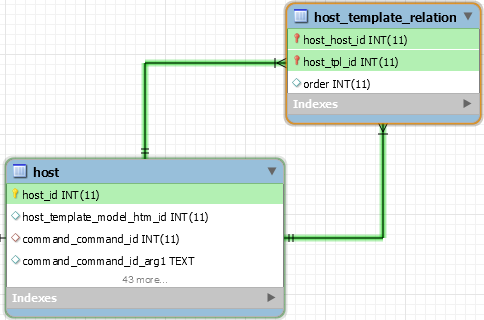
Relation Host/HostTemplate
Schéma
Analyse
Pour avoir ces informations nous pouvons avoir 3 approches :
- Depuis la table des hôtes
- Recherche depuis les hôtes avec le champ host_register=’1’
- Recherche depuis les templates avec le champ host_register=’0’
- Depuis la table des relations
Requête
Recherche depuis les hôtes
SELECT HST.host_name AS Host,
  HTPL.host_name AS Template
FROM centreon.host as HST
LEFT JOIN centreon.host_template_relation AS HTR ON HTR.host_host_id=HST.host_id
LEFT JOIN centreon.host as HTPL ON HTPL.host_id=HTR.host_tpl_id
WHERE HST.host_register="1"
AND HST.host_activate="1"Recherche depuis les templates
SELECT HST.host_name AS HOST,
  HTPL.host_name AS Host
FROM centreon.host as HTPL
LEFT JOIN centreon.host_template_relation AS HTR ON HTR.host_tpl_id=HTPL.host_id
LEFT JOIN centreon.host AS HST ON HTR.host_host_id=HST.host_id
WHERE HTPL.host_register="0"
AND HTPL.host_activate="1"
AND HST.host_register="1"
ORDER BY HST.host_name,HTPL.host_name;Recherche depuis les relations
SELECT HST.host_name AS HOST,
  HTPL.host_name AS Host
FROM centreon.host_template_relation AS HTR
LEFT JOIN centreon.host AS HTPL ON HTR.host_tpl_id=HTPL.host_id
LEFT JOIN centreon.host AS HST ON HTR.host_host_id=HST.host_id
WHERE HTPL.host_register="0"
AND HTPL.host_activate="1"
AND HST.host_register="1"
ORDER BY HST.host_name,HTPL.host_name ;Résultat
| host | Template |
|---|---|
| Central-Centreon | App-Monitoring-Centreon-Central-custom |
| Central-Centreon | OS-Linux-SNMP-custom |
| Central-OMR | TH_App-Monitoring-Centreon-Central |
| Central-OMR | TH_App-Webserver-Apache-ServerStatus |
| Central-OMR | TH_OS-Linux-SNMP |
| Centreon-OMR-Database1 | TH_App-DB-MySQL |
| Centreon-OMR-Database1 | TH_OS-Linux-SNMP |
| communaute-omr.fr | TH_App-Webserver-Apache-ServerStatus |
| communaute-omr.fr | TH_OS-Linux-SNMP |
| Poller-1 | generic-active-host-custom |
| Poller-2 | TH_App-Monitoring-Centreon-Poller |
| Poller-2 | TH_OS-Linux-SNMP |
Relation Host/Service
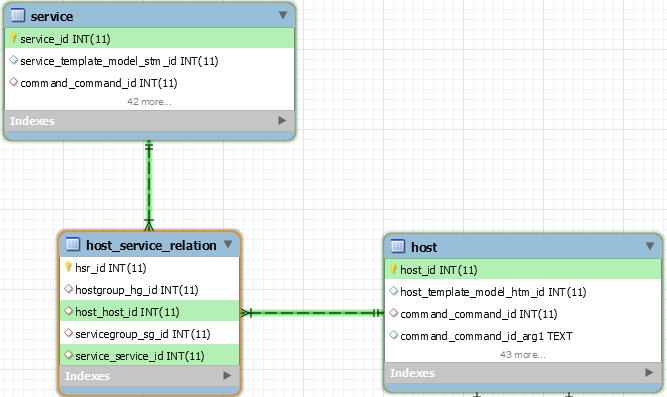
Schéma
Analyse
Le schéma ci-dessus nous montre la relation entre les hôtes et les services :
Nous voyons que la table host_service_relation est au centreon de la jointure :
- host.host_id= host_service_relation.host_host_id
- host_service_relation.service_service_id=service.service_id
Il est important de noter que cette relation est valable oussi bien pour les hôtes que pour les Templates.
Il suffira donc de placer le flag register (host ou service) à 0 ou 1 pour déterminer le but de la requete
Requête
Vision depuis les services
SELECT HST.host_name,
  HST.host_address,
  SVC.service_description
FROM centreon.service AS SVC
LEFT JOIN centreon.host_service_relation AS HSR ON HSR.service_service_id=SVC.service_id
LEFT JOIN centreon.host AS HST ON HST.host_id=HSR.host_host_id
WHERE HST.host_register="1"
AND HST.host_activate="1"
ORDER BY HST.host_name,SVC.service_description;Vision depuis les hôtes
SELECT HST.host_name,
  HST.host_address,
  SVC.service_description
FROM centreon.host AS HST
LEFT JOIN centreon.host_service_relation AS HSR ON HSR.host_host_id=HST.host_id
LEFT JOIN centreon.service AS SVC ON SVC.service_id=HSR.service_service_id
WHERE HST.host_register="1"
AND HST.host_activate="1"
ORDER BY HST.host_name,SVC.service_description;Résultat partiel
| HOST | host_address | service_description |
|---|---|---|
| Central-OMR | 192.168.12.110 | App-Monitoring-Centreon-Broker-module-Stats |
| Central-OMR | 192.168.12.110 | App-Monitoring-Centreon-Broker-RRD-Stats-Central |
| Central-OMR | 192.168.12.110 | App-Monitoring-Centreon-Broker-SQL-Stats-Central |
| Central-OMR | 192.168.12.110 | App-Monitoring-Centreon-Process-broker-rrd |
| Central-OMR | 192.168.12.110 | App-Monitoring-Centreon-Process-broker-sql |
| Central-OMR | 192.168.12.110 | App-Monitoring-Centreon-Process-cbd |
| Central-OMR | 192.168.12.110 | App-Monitoring-Centreon-Process-centengine |
| Central-OMR | 192.168.12.110 | App-Monitoring-Centreon-Process-gorgoned |
| Central-OMR | 192.168.12.110 | App-Webserver-Apache-Content-Status |
| Central-OMR | 192.168.12.110 | App-Webserver-Apache-Cpuload |
| Central-OMR | 192.168.12.110 | App-Webserver-Apache-Process-httpd-Stats |
| Central-OMR | 192.168.12.110 | App-Webserver-Apache-Process-httpd-Status |
| Central-OMR | 192.168.12.110 | App-Webserver-Apache-ResponseTime |
| Central-OMR | 192.168.12.110 | App-Webserver-Apache-SlotStates |
| Central-OMR | 192.168.12.110 | App-Webserver-Apache-Workers |
| Central-OMR | 192.168.12.110 | OS-Linux-Disk-/-Usage |
| Central-OMR | 192.168.12.110 | OS-Linux-Disk-/home-Usage |
| Central-OMR | 192.168.12.110 | OS-Linux-Process-crond-Status |
| Central-OMR | 192.168.12.110 | OS-Linux-Process-ntpd-Status |
| Central-OMR | 192.168.12.110 | OS-Linux-Process-snmpd-Status |
| Central-OMR | 192.168.12.110 | OS-Linux-Process-sshd-Status |
| Central-OMR | 192.168.12.110 | OS-Linux-SYS-CPU |
| Central-OMR | 192.168.12.110 | OS-Linux-SYS-CPU-Detailed |
| Central-OMR | 192.168.12.110 | OS-Linux-SYS-Load |
| Central-OMR | 192.168.12.110 | OS-Linux-SYS-Memory |
| Central-OMR | 192.168.12.110 | OS-Linux-SYS-NTP |
| Central-OMR | 192.168.12.110 | OS-Linux-SYS-Swap |
| Central-OMR | 192.168.12.110 | OS-Linux-SYS-Uptime |
| Central-OMR | 192.168.12.110 | Ping |
| Centreon-OMR-Database1 | 192.168.12.111 | App-DB-MySQL-Connection-Time |
| Centreon-OMR-Database1 | 192.168.12.111 | App-DB-MySQL-Connections-Number |
| Centreon-OMR-Database1 | 192.168.12.111 | App-DB-MySQL-Database-Size |
| Centreon-OMR-Database1 | 192.168.12.111 | App-DB-MySQL-Long-Queries |
| Centreon-OMR-Database1 | 192.168.12.111 | App-DB-Mysql-Process-mysqld-Status |
| Centreon-OMR-Database1 | 192.168.12.111 | App-DB-MySQL-Slowqueries |
| Centreon-OMR-Database1 | 192.168.12.111 | App-DB-MySQL-Uptime |
| Centreon-OMR-Database1 | 192.168.12.111 | OS-Linux-Disk-/-Usage |
| Centreon-OMR-Database1 | 192.168.12.111 | OS-Linux-Disk-/home-Usage |
| Centreon-OMR-Database1 | 192.168.12.111 | OS-Linux-Disk-/var/lib/mysql-Usage |
| Centreon-OMR-Database1 | 192.168.12.111 | OS-Linux-Disk-/var/log/mysql-Usage |
| Centreon-OMR-Database1 | 192.168.12.111 | OS-Linux-Process-crond-Status |
| Centreon-OMR-Database1 | 192.168.12.111 | OS-Linux-Process-ntpd-Status |
| Centreon-OMR-Database1 | 192.168.12.111 | OS-Linux-Process-snmpd-Status |
| Centreon-OMR-Database1 | 192.168.12.111 | OS-Linux-Process-sshd-Status |
| Centreon-OMR-Database1 | 192.168.12.111 | OS-Linux-SYS-CPU |
| Centreon-OMR-Database1 | 192.168.12.111 | OS-Linux-SYS-CPU-Detailed |
| Centreon-OMR-Database1 | 192.168.12.111 | OS-Linux-SYS-Load |
| Centreon-OMR-Database1 | 192.168.12.111 | OS-Linux-SYS-Memory |
| Centreon-OMR-Database1 | 192.168.12.111 | OS-Linux-SYS-NTP |
| Centreon-OMR-Database1 | 192.168.12.111 | OS-Linux-SYS-Swap |
| Centreon-OMR-Database1 | 192.168.12.111 | OS-Linux-SYS-Uptime |
| Centreon-OMR-Database1 | 192.168.12.111 | Ping |
Relation Host/HostGroups
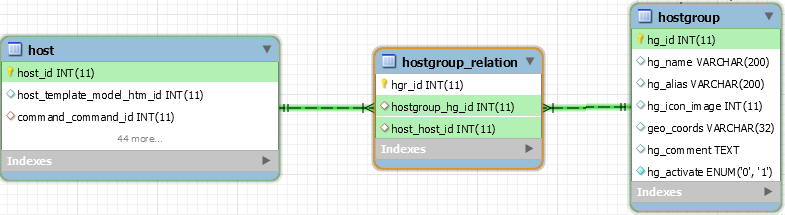
Schéma
Analyse
Le schéma ci-dessus nous montre la relation entre les services et templates de service :
Comme indiqué ci-dessus il n’y a pas de table de relation entre les services et ses
Requête
Vision depuis la table host
SELECT HG.hg_name AS HOSTGROUP,
HG.hg_alias AS DESCRIPTION,
HST.host_name AS HOST
FROM centreon.host AS HST
LEFT JOIN centreon.hostgroup_relation AS HGR ON HGR.host_host_id=HST.host_id
LEFT JOIN centreon.hostgroup AS HG ON HG.hg_id=HGR.hostgroup_hg_id
WHERE HST.host_activate="1"
AND HST.host_register="1"
ORDER BY HG.hg_name,HST.host_name;Vision depuis la table hostgroup
SELECT HG.hg_name AS HOSTGROUP,
HG.hg_alias AS DESCRIPTION,
HST.host_name AS HOST
FROM centreon.hostgroup AS HG
LEFT JOIN centreon.hostgroup_relation AS HGR ON HGR.hostgroup_hg_id=HG.hg_id
LEFT JOIN centreon.host AS HST ON HST.host_id=HGR.host_host_id
WHERE HST.host_activate="1"
AND HST.host_register="1"
ORDER BY HG.hg_name,HST.host_name;Résultat
| HOSTGROUP | DESCRIPTION | HOST |
|---|---|---|
| Centreon | Serveurs centreon | Central-OMR-WEB1 |
| Centreon | Serveurs centreon | Central-OMR-WEB2 |
| Centreon | Serveurs centreon | Centreon-OMR-Database1 |
| Centreon | Serveurs centreon | Centreon-OMR-Database2 |
| Centreon | Serveurs centreon | Poller-1 |
| Centreon | Serveurs centreon | Poller-2 |
| Centreon_Cluster | Serveurs du cluster Centreon | Central-OMR-WEB1 |
| Centreon_Cluster | Serveurs du cluster Centreon | Central-OMR-WEB2 |
| Centreon_Cluster | Serveurs du cluster Centreon | Centreon-OMR-WEB-VIP |
| Centreon_Cluster | Serveurs du cluster Centreon | Centreon-OMR-Database1 |
| Centreon_Cluster | Serveurs du cluster Centreon | Centreon-OMR-Database2 |
| Centreon_Cluster | Serveurs du cluster Centreon | Centreon-OMR-DB-VIP |
| Communaute-omr | Portail de la communaute | communaute-omr.fr |
| Pollers_LAN | Pollers Centreon LAN | Poller-2 |
| Pollers_WAN | Poller centreon WAN | Poller-1 |
Relation Host/HostCategories
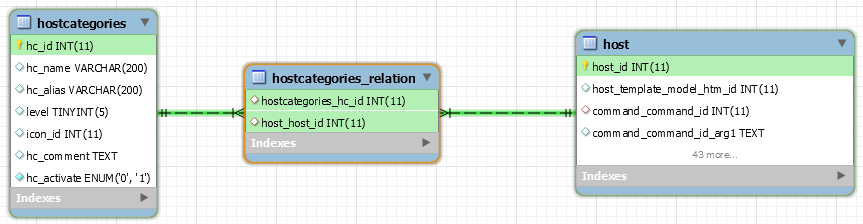
Schéma
Analyse
Le schéma ci-dessus nous montre la relation entre la table host et hostgategories
Le lien entre les tables se fera via les ID stockés dans la table hostcategories_relation
Requête
Vision depuis la table host
SELECT HST.host_name AS HOST,
HC.hc_name AS HOSTCATEGORY
FROM centreon.host AS HST
LEFT JOIN centreon.hostcategories_relation AS HCR ON HCR.host_host_id=HST.host_id
LEFT JOIN centreon.hostcategories AS HC ON HC.hc_id=HCR.hostcategories_hc_id
WHERE HST.host_activate="1"
AND HST.host_register="1"
ORDER BY HC.hc_name,HST.host_name;Vision depuis la table hostcategories
SELECT HST.host_name AS HOST,
HC.hc_name AS HOSTCATEGORY
FROM centreon.hostcategories AS HC
LEFT JOIN centreon.hostcategories_relation AS HCR ON HCR.hostcategories_hc_id=HC.hc_id
LEFT JOIN centreon.host AS HST ON HST.host_id=HCR.host_host_id
WHERE HST.host_activate="1"
AND HST.host_register="1"
ORDER BY HC.hc_name,HST.host_name;Résultat
| HOST | HOSTCATEGORY |
|---|---|
| Central-OMR-WEB1 | HC_Centreon |
| Central-OMR-WEB2 | HC_Centreon |
| Poller-2 | HC_Centreon |
| Centreon-OMR-Database1 | HC_Centreon-DB |
| Centreon-OMR-Database2 | HC_Centreon-DB |
| Central-OMR-WEB1 | HC_Centreon-Master |
| Centreon-OMR-Database1 | HC_Centreon-Master |
| Central-OMR-WEB2 | HC_Centreon-Slave |
| Centreon-OMR-Database2 | HC_Centreon-Slave |
| Centreon-OMR-central-VIP | HC_Centreon-VIP |
| Centreon-OMR-DB-VIP | HC_Centreon-VIP |