
Installation de WordPress
Avant-propos
Dans cet article nous allons installer un serveur wordpress sur un serveur ALMA9
Installation du serveur WEB
Préparation des dépots
dnf install -y dnf-plugins-core
dnf install -y epel-release
dnf config-manager --set-enabled crbContrôle des dépôts
[root@demo-alma9 ~]#dnf repolist
id du dépôt                                                           nom du dépôt
appstream                                                             AlmaLinux 9 - AppStream
baseos                                                                AlmaLinux 9 - BaseOS
crb                                                                   AlmaLinux 9 - CRB
epel                                                                  Extra Packages for Enterprise Linux 9 - x86_64
epel-cisco-openh264                                                   Extra Packages for Enterprise Linux 9 openh264 (From Cisco) - x86_64
extras AlmaLinux 9 – ExtrasInstallation de php
dnf module reset php
dnf module install php:8.2
Dépendances résolues.
=============================================================================================================================================================================================
Paquet                                      Architecture                      Version                                                            Dépôt                                Taille
=============================================================================================================================================================================================
Installation des paquets du groupe/module:
php-cli                                     x86_64                            8.2.32-1.module_el9.8.0+284+2e0ccc92                               appstream                            3.6 M
php-common                                  x86_64                            8.2.32-1.module_el9.8.0+284+2e0ccc92                               appstream                            709 k
php-fpm                                     x86_64                            8.2.32-1.module_el9.8.0+284+2e0ccc92                               appstream                            1.8 M
php-mbstring                                x86_64                            8.2.32-1.module_el9.8.0+284+2e0ccc92                               appstream                            519 k
php-xml                                     x86_64                            8.2.32-1.module_el9.8.0+284+2e0ccc92                               appstream                            143 k
Installation des dépendances:
httpd-filesystem                            noarch                            2.4.62-13.el9_8.5                                                  appstream                             13 k
libxslt                                     x86_64                            1.1.34-14.el9_8.1                                                  appstream                            240 k
nginx-filesystem                            noarch                            2:1.20.1-28.el9_8.4.alma.1                                         appstream                             11 k
Installation des profils de module:
php/common
Activation des flux de modules:
php                                                                           8.2
Résumé de la transaction
=============================================================================================================================================================================================
Installer  8 Paquets
Taille totale des téléchargements : 7.0 M
Taille des paquets installés : 35 M
Voulez-vous continuer ? [o/N] : o
Téléchargement des paquets :
(1/8): nginx-filesystem-1.20.1-28.el9_8.4.alma.1.noarch.rpm                                                                                                  267 kB/s |  11 kB     00:00
(2/8): httpd-filesystem-2.4.62-13.el9_8.5.noarch.rpm                                                                                                         305 kB/s |  13 kB     00:00
(3/8): libxslt-1.1.34-14.el9_8.1.x86_64.rpm                                                                                                                  2.6 MB/s | 240 kB     00:00
(4/8): php-common-8.2.32-1.module_el9.8.0+284+2e0ccc92.x86_64.rpm                                                                                            5.1 MB/s | 709 kB     00:00
(5/8): php-fpm-8.2.32-1.module_el9.8.0+284+2e0ccc92.x86_64.rpm                                                                                                17 MB/s | 1.8 MB     00:00
(6/8): php-cli-8.2.32-1.module_el9.8.0+284+2e0ccc92.x86_64.rpm                                                                                                19 MB/s | 3.6 MB     00:00
(7/8): php-xml-8.2.32-1.module_el9.8.0+284+2e0ccc92.x86_64.rpm                                                                                               2.9 MB/s | 143 kB     00:00
(8/8): php-mbstring-8.2.32-1.module_el9.8.0+284+2e0ccc92.x86_64.rpm                                                                                          6.3 MB/s | 519 kB     00:00
---------------------------------------------------------------------------------------------------------------------------------------------------------------------------------------------
Total                                                                                                                                                         13 MB/s | 7.0 MB     00:00
Test de la transaction
La vérification de la transaction a réussi.
Lancement de la transaction de test
Transaction de test réussie.
Exécution de la transaction
Préparation           :                                                                                                                                                                1/1
Installation          : php-common-8.2.32-1.module_el9.8.0+284+2e0ccc92.x86_64                                                                                                         1/8
Exécution du scriptlet: nginx-filesystem-2:1.20.1-28.el9_8.4.alma.1.noarch                                                                                                             2/8
Installation          : nginx-filesystem-2:1.20.1-28.el9_8.4.alma.1.noarch                                                                                                             2/8
Installation          : libxslt-1.1.34-14.el9_8.1.x86_64                                                                                                                               3/8
Exécution du scriptlet: httpd-filesystem-2.4.62-13.el9_8.5.noarch                                                                                                                      4/8
Installation          : httpd-filesystem-2.4.62-13.el9_8.5.noarch                                                                                                                      4/8
Installation          : php-fpm-8.2.32-1.module_el9.8.0+284+2e0ccc92.x86_64                                                                                                            5/8
Exécution du scriptlet: php-fpm-8.2.32-1.module_el9.8.0+284+2e0ccc92.x86_64                                                                                                            5/8
Installation          : php-xml-8.2.32-1.module_el9.8.0+284+2e0ccc92.x86_64                                                                                                            6/8
Installation          : php-cli-8.2.32-1.module_el9.8.0+284+2e0ccc92.x86_64                                                                                                            7/8
Installation          : php-mbstring-8.2.32-1.module_el9.8.0+284+2e0ccc92.x86_64                                                                                                       8/8
Exécution du scriptlet: php-mbstring-8.2.32-1.module_el9.8.0+284+2e0ccc92.x86_64                                                                                                       8/8
Vérification de       : httpd-filesystem-2.4.62-13.el9_8.5.noarch                                                                                                                      1/8
Vérification de       : libxslt-1.1.34-14.el9_8.1.x86_64                                                                                                                               2/8
Vérification de       : nginx-filesystem-2:1.20.1-28.el9_8.4.alma.1.noarch                                                                                                             3/8
Vérification de       : php-cli-8.2.32-1.module_el9.8.0+284+2e0ccc92.x86_64                                                                                                            4/8
Vérification de       : php-common-8.2.32-1.module_el9.8.0+284+2e0ccc92.x86_64                                                                                                         5/8
Vérification de       : php-fpm-8.2.32-1.module_el9.8.0+284+2e0ccc92.x86_64                                                                                                            6/8
Vérification de       : php-mbstring-8.2.32-1.module_el9.8.0+284+2e0ccc92.x86_64                                                                                                       7/8
Vérification de       : php-xml-8.2.32-1.module_el9.8.0+284+2e0ccc92.x86_64                                                                                                            8/8
Installé:
httpd-filesystem-2.4.62-13.el9_8.5.noarch                        libxslt-1.1.34-14.el9_8.1.x86_64                               nginx-filesystem-2:1.20.1-28.el9_8.4.alma.1.noarch
php-cli-8.2.32-1.module_el9.8.0+284+2e0ccc92.x86_64              php-common-8.2.32-1.module_el9.8.0+284+2e0ccc92.x86_64         php-fpm-8.2.32-1.module_el9.8.0+284+2e0ccc92.x86_64
php-mbstring-8.2.32-1.module_el9.8.0+284+2e0ccc92.x86_64         php-xml-8.2.32-1.module_el9.8.0+284+2e0ccc92.x86_64
Terminé !Installation du server Apache et mariadb
dnf install -y httpd php mariadb mariadb-server mod_ssl openssl php-mysqlnd php-fpm php-xml php-mbstring php-json php-curlInstallation des outils
dnf install -y wget unzip -yPréparation du serveur
Démarrage des services
systemctl enable --now httpd.service php-fpm.service mariadb
Created symlink /etc/systemd/system/multi-user.target.wants/httpd.service → /usr/lib/systemd/system/httpd.service.
Created symlink /etc/systemd/system/multi-user.target.wants/php-fpm.service → /usr/lib/systemd/system/php-fpm.service.
Created symlink /etc/systemd/system/mysql.service → /usr/lib/systemd/system/mariadb.service.
Created symlink /etc/systemd/system/mysqld.service → /usr/lib/systemd/system/mariadb.service.
Created symlink /etc/systemd/system/multi-user.target.wants/mariadb.service → /usr/lib/systemd/system/mariadb.service.Gestion de la sécurité
Mon serveur virtualisé n’étant pas disponible directement, la gestion de la sécurité réseau se fait au niveau de mon serveur physique.
On va donc désactiver tous les outils de gestion de sécurité (selinux, firewalld)
- Désactivation de selinux
sed -i s/^SELINUX=.*$/SELINUX=disabled/ /etc/selinux/config- Désactivation de firewalld
[root@demo-alma9 ~]# systemctl disable firewalld
Removed "/etc/systemd/system/multi-user.target.wants/firewalld.service".
Removed "/etc/systemd/system/dbus-org.fedoraproject.FirewallD1.service".
[root@demo-alma9 ~]# systemctl stop firewalld- On redémarre le serveur
reboot -n- On contrôle selinux
[root@demo-alma9 ~]# sestatus
SELinux status: disabled- On contrôle les services
systemctl status httpd php-fpm mariadb firewalld| egrep "Active|.service"
● httpd.service - The Apache HTTP Server
Loaded: loaded (/usr/lib/systemd/system/httpd.service; enabled; preset: disabled)
Drop-In: /etc/systemd/system/httpd.service.d
Active: active (running) since Fri 2026-07-31 11:29:44 CEST; 4min 16s ago
Docs: man:httpd.service(8)
CGroup: /system.slice/httpd.service
● php-fpm.service - The PHP FastCGI Process Manager
Loaded: loaded (/usr/lib/systemd/system/php-fpm.service; enabled; preset: disabled)
Active: active (running) since Fri 2026-07-31 11:29:44 CEST; 4min 16s ago
CGroup: /system.slice/php-fpm.service
● mariadb.service - MariaDB 10.5 database server
Loaded: loaded (/usr/lib/systemd/system/mariadb.service; enabled; preset: disabled)
Active: active (running) since Fri 2026-07-31 11:29:44 CEST; 4min 16s ago
Process: 824 ExecStartPre=/usr/libexec/mariadb-prepare-db-dir mariadb.service (code=exited, status=0/SUCCESS)
CGroup: /system.slice/mariadb.service
○ firewalld.service - firewalld - dynamic firewall daemon
Loaded: loaded (/usr/lib/systemd/system/firewalld.service; disabled; preset: enabled)
Active: inactive (dead)- Interface WEB
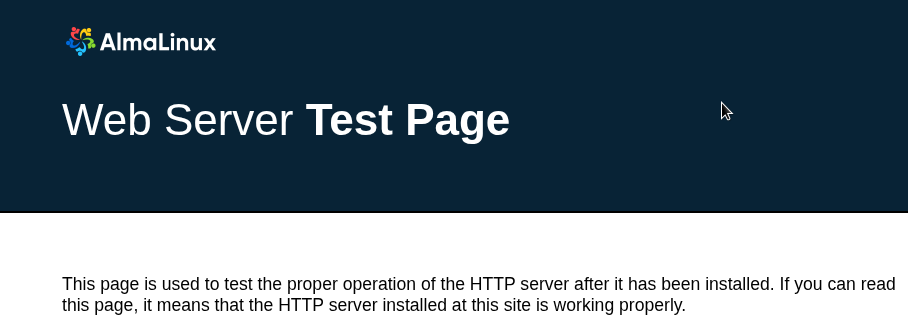
Préparation de l’installation
Mariadb
- On se connecte à la base de données
mariadb- Création de l’utilisateur pour wordpress
CREATE USER 'wordpressuser'@'localhost' IDENTIFIED BY 'SuperMDP';
Query OK, 0 rows affected (0,001 sec)
GRANT ALL PRIVILEGES ON wordpress.* TO 'wordpressuser'@'localhost';
Query OK, 0 rows affected (0,001 sec)
FLUSH PRIVILEGES;
Query OK, 0 rows affected (0,001 sec)- Création du compte d’administration
CREATE USER 'admin'@'%' IDENTIFIED BY '1SuperMot2PasseSecurPourMar!adb';
Query OK, 0 rows affected (0,001 sec)
GRANT ALL PRIVILEGES ON admin.* TO 'calou'@'%';
Query OK, 0 rows affected (0,001 sec)
FLUSH PRIVILEGES;
Query OK, 0 rows affected (0,001 sec)- Contrôle des comptes
use mysql;
Reading table information for completion of table and column names
You can turn off this feature to get a quicker startup with -A
Database changed
MariaDB [mysql]> select User,Host,Password from user;
+---------------+-----------+-------------------------------------------+
| User          | Host      | Password                                  |
+---------------+-----------+-------------------------------------------+
| mariadb.sys   | localhost |                                           |
| root          | localhost | invalid                                   |
| mysql         | localhost | invalid                                   |
| wordpressuser | localhost | *BE6546DEE14713918870EDE4090EEC4F2D4E5973 |
| admin         | %         | *BE6546DEE14713918870EDE4090EEC4F2D4E5973 |
+---------------+-----------+-------------------------------------------+
5 rows in set (0,001 sec)- Création de la base de données
MariaDB [mysql]> create database wordpress;
Query OK, 1 row affected (0,000 sec)- Contrôle
MariaDB [mysql]> show databases;
+--------------------+
| Database           |
+--------------------+
| information_schema |
| mysql              |
| performance_schema |
| wordpress          |
+--------------------+
4 rows in set (0,000 sec)Apache
Maintenant que le serveur WEB est disponible nous pouvons installer wordpress
- On se positionne à la racine de notre site
cd /var/www/html- On télécharge les sources
wget https://wordpress.org/latest.tar.gz
--2026-07-31 12:00:40--  https://wordpress.org/latest.tar.gz
Résolution de wordpress.org (wordpress.org)… 66.6.42.252, 2620:109:b00a::4206:2afc
Connexion à wordpress.org (wordpress.org)|66.6.42.252|:443… connecté.
requête HTTP transmise, en attente de la réponse… 200 OK
Taille : 29551444 (28M) [application/octet-stream]
Sauvegarde en : « latest.tar.gz »
latest.tar.gz                                   100%[====================================================================================================>]  28,18M  20,0MB/s    ds 1,4s
2026-07-31 12:00:42 (20,0 MB/s) — « latest.tar.gz » sauvegardé [29551444/29551444]- On décompresse l’archive
[root@demo-alma9 html]# tar xzf latest.tar.gz- On veut rendre notre site accessible directement depuis la racine d’apache
[root@demo-alma9 html]# mv ./wordpress/* ./- Et on donne les droits à apache
chown -R apache: /var/www- On contrôle
[root@demo-alma9 html]# ls -l
total 29092
-rw-r--r--  1 apache apache      405  6 févr.  2020 index.php
-rw-r--r--  1 apache apache 29551444 17 juil. 20:01 latest.tar.gz
-rw-r--r--  1 apache apache    19903  1 janv.  2026 license.txt
-rw-r--r--  1 apache apache     7406  9 janv.  2026 readme.html
drwxr-xr-x  2 apache apache        6 31 juil. 12:04 wordpress
-rw-r--r--  1 apache apache     7371 17 févr. 18:05 wp-activate.php
drwxr-xr-x  9 apache apache     4096 17 juil. 19:52 wp-admin
-rw-r--r--  1 apache apache      351  6 févr.  2020 wp-blog-header.php
-rw-r--r--  1 apache apache     2323 14 juin   2023 wp-comments-post.php
-rw-r--r--  1 apache apache     3339 12 août   2025 wp-config-sample.php
drwxr-xr-x  4 apache apache       52 19 mai   07:12 wp-content
-rw-r--r--  1 apache apache     5617  2 août   2024 wp-cron.php
drwxr-xr-x 34 apache apache    12288 17 juil. 19:52 wp-includes
-rw-r--r--  1 apache apache     2493 30 avril  2025 wp-links-opml.php
-rw-r--r--  1 apache apache     3937 11 mars   2024 wp-load.php
-rw-r--r--  1 apache apache    51850 28 févr. 23:57 wp-login.php
-rw-r--r--  1 apache apache     8727  3 avril  2025 wp-mail.php
-rw-r--r--  1 apache apache    32650  8 mai   17:59 wp-settings.php
-rw-r--r--  1 apache apache    34621 17 févr. 18:05 wp-signup.php
-rw-r--r--  1 apache apache     5214 19 août   2025 wp-trackback.php
-rw-r--r-- 1 apache apache 3205 8 nov. 2024 xmlrpc.phpNous pouvons maintenant contrôler que notre site est bien disponible via l’url http://<monsite> qui devrait être rediriger vers http://<monsite>/wp-admin/setup-config.php
Finalisation de l’installation
Nous avons 2 méthodes pour configurer WordPress
- Directement via le fichier de configuration
cp wp-config-sample.php wp-config.phpOn modifie le fichier directement dans un éditeur de texte
- Via L’interface nous allons voir cela
Dans les 2 cas le résultat sera le même
Choix de la langue
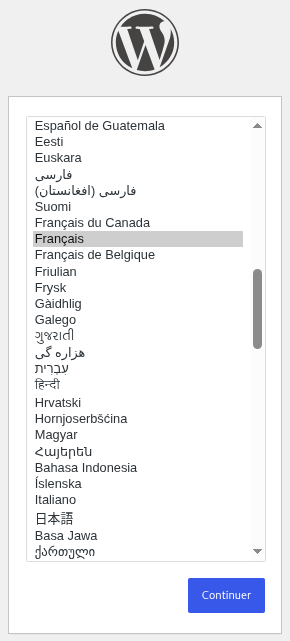
Lancement de l’installation
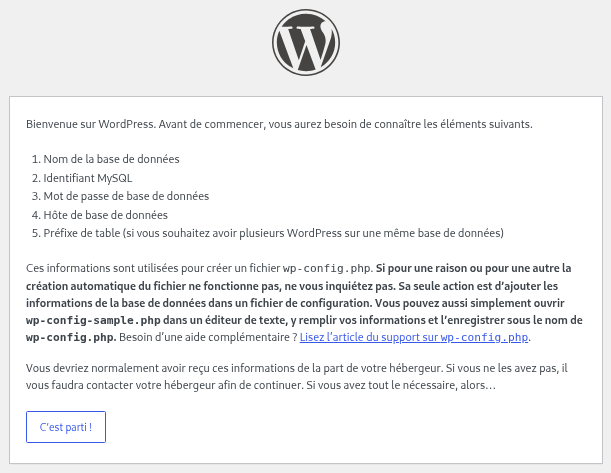
On va donc cliquer directement sur « c’est parti » pour lancer la configuration via l’interface
Crédentials
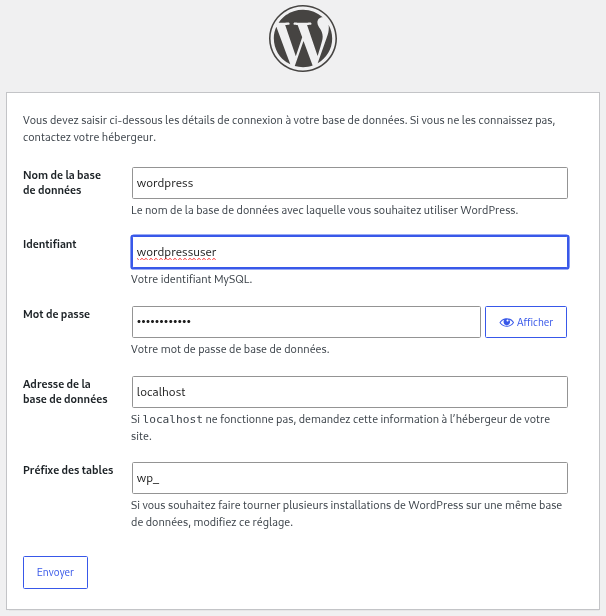
On renseigne les champs avec les éléments configuré dans les chapitres précédents :
- Nom de la base de données
- L’utilisateur WordPress
- Son mot de passe
- Le serveur ou est hébergé la base de données
- Le préfixe pour les tables
On soumet
Début de l’installation
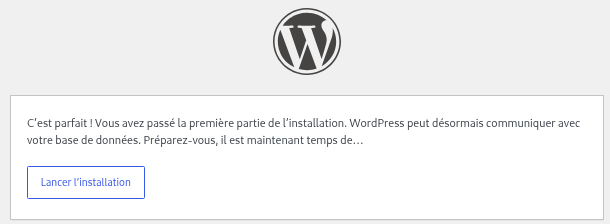
- On lance l’installation
Configuration du site
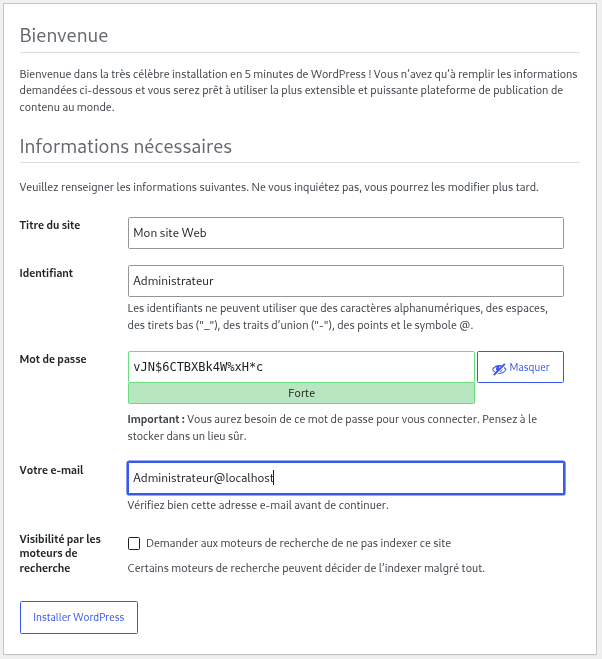
On peut laisser le MDP proposer ou mettre le sien
- On clique sur « installer wordpress »
Première connexion
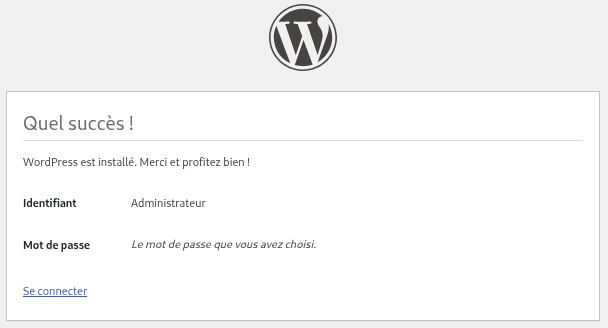
On est prêt 😀
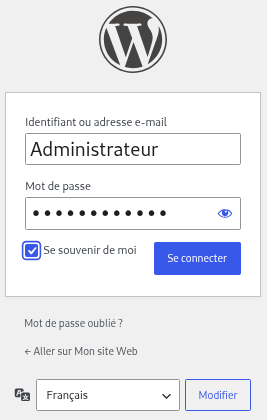
On renseigne avec les informations fournies lors de l’installation
L’interface
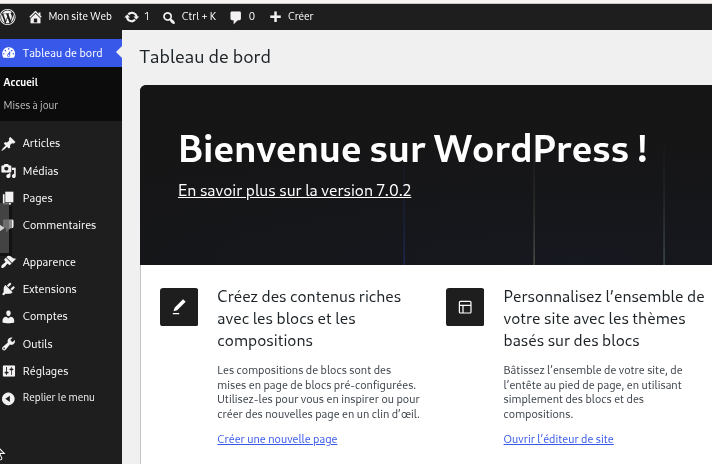
Une fois connecté notre site est disponible
Contrôle du fichier de configuration
On peut constater sur le serveur que l’installeur à créer le fichier de configuration wp-config.php
En regardant le fichier tous les champs sont renseignés
<?php
/**
* The base configuration for WordPress
*
* The wp-config.php creation script uses this file during the installation.
* You don't have to use the website, you can copy this file to "wp-config.php"
* and fill in the values.
*
* This file contains the following configurations:
*
* * Database settings
* * Secret keys
* * Database table prefix
* * ABSPATH
*
* @link https://developer.wordpress.org/advanced-administration/wordpress/wp-config/
*
* @package WordPress
*/
// ** Database settings - You can get this info from your web host ** //
/** The name of the database for WordPress */
define( 'DB_NAME', 'wordpress' );
/** Database username */
define( 'DB_USER', 'wordpressuser' );
/** Database password */
define( 'DB_PASSWORD', 'THEPASSWORD' );
/** Database hostname */
define( 'DB_HOST', 'localhost' );
/** Database charset to use in creating database tables. */
define( 'DB_CHARSET', 'utf8mb4' );
/** The database collate type. Don't change this if in doubt. */
define( 'DB_COLLATE', '' );
/**#@+
* Authentication unique keys and salts.
*
* Change these to different unique phrases! You can generate these using
* the {@link https://api.wordpress.org/secret-key/1.1/salt/ WordPress.org secret-key service}.
*
* You can change these at any point in time to invalidate all existing cookies.
* This will force all users to have to log in again.
*
* @since 2.6.0
*/
define( 'AUTH_KEY',         'G-s?yB@|!0!:k>4|UkwO:3W6]7DpOxW/$|;eYSC0!ids, &PqW.q)-=xlgy#[3}7' );
define( 'SECURE_AUTH_KEY',  'gGHMO]-q(}~RC8 aYZVmVrS!V?abQ@ P0|ce[(=UTK~B]rU6+423S[!M,GZYh6j0' );
define( 'LOGGED_IN_KEY',    '*HWX#dWIo}mqbj9E~+C>?AXy2aF ;>2)wL HEEU~eJ&,jiROq!W]A z;D>>Dy?sP' );
define( 'NONCE_KEY',        ')T3HCwIpfSh~9=Z.jvTAQrxQ _>mn@d{Ra7d)o:Vc3b}9mS^(0_8?/A4oxk<XB%d' );
define( 'AUTH_SALT',        'x{C5gm7EmvL-9Oxmf&F)wFmG=es=vXp9x5q$[7fnW4#ik1;+=In8j}bJS+-;Nj<a' );
define( 'SECURE_AUTH_SALT', '_SnTANs5)`G.Qu,l)g[tkO7bM8bmVO6jnLPqf)E}-F.3nN-3yD=lz+;Q5yPtsm>1' );
define( 'LOGGED_IN_SALT',   'AOhkkq=+AR!U:@O|v_Jw8,M#A;]vJ[U3fTh^ihA}`q[I|.;r_b@0~InrE[c+M|ao' );
define( 'NONCE_SALT',       '_10NZHFB^gLzNy]RAizlPSaKZ k3Ssp(8%2a(m^>j&&Zz[m#9xy/yh/[e~hzpRqS' );
/**#@-*/
/**
* WordPress database table prefix.
*
* You can have multiple installations in one database if you give each
* a unique prefix. Only numbers, letters, and underscores please!
*
* At the installation time, database tables are created with the specified prefix.
* Changing this value after WordPress is installed will make your site think
* it has not been installed.
*
* @link https://developer.wordpress.org/advanced-administration/wordpress/wp-config/#table-prefix
*/
$table_prefix = 'wp_';
/**
* For developers: WordPress debugging mode.
*
* Change this to true to enable the display of notices during development.
* It is strongly recommended that plugin and theme developers use WP_DEBUG
* in their development environments.
*
* For information on other constants that can be used for debugging,
* visit the documentation.
*
* @link https://developer.wordpress.org/advanced-administration/debug/debug-wordpress/
*/
define( 'WP_DEBUG', false );
/* Add any custom values between this line and the "stop editing" line. */
/* That's all, stop editing! Happy publishing. */
/** Absolute path to the WordPress directory. */
if ( ! defined( 'ABSPATH' ) ) {
define( 'ABSPATH', __DIR__ . '/' );
}
/** Sets up WordPress vars and included files. */
require_once ABSPATH . 'wp-settings.php';Autoriser le proxy https
Nous devons éditer le fichier wp-config.php pour que notre site communique vers l’extérieur du LAN en HTTPS
/* Pour le reverse proxy nginx */
if(isset($_SERVER['HTTP_X_FORWARDED_FOR'])) {
$list = explode(',',$_SERVER['HTTP_X_FORWARDED_FOR']);
$_SERVER['REMOTE_ADDR'] = $list[0];
}
define( 'WP_HOME', 'https://monsite.fr' );
define( 'WP_SITEURL', 'https://monsite.fr' );
$_SERVER['HTTP_HOST'] = 'monsite.fr';
$_SERVER['REMOTE_ADDR'] = 'https:monsite.fr';
$_SERVER[ 'SERVER_ADDR' ] = 'monsite';
define( 'WP_AUTO_UPDATE_CORE', true );
add_filter( 'auto_update_core', '__return_true' );
add_filter( 'allow_major_auto_core_updates', '__return_true' );
define('FS_METHOD', 'direct');- Ajouter ces lignes à la fin du fichier
- Remplacer monsite par les valeurs de votre contexte